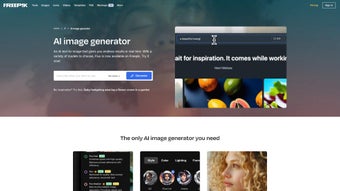

Download Wepik – AI‑Powered Image Generator, Free & Secure
Overview
Wepik is an AI‑driven image creation platform that transforms simple text prompts into high‑resolution photographs, digital illustrations, or even 3D‑style paintings in a matter of seconds. Built for creators of all skill levels, the service removes the steep learning curve traditionally associated with graphic‑design software. Whether you’re a marketer needing fresh social‑media visuals, a small‑business owner designing flyers, or an artist exploring new creative horizons, Wepik delivers professional‑grade results without requiring any prior design knowledge. The core technology relies on advanced diffusion models fine‑tuned for speed and fidelity, ensuring that each generated image maintains sharp detail and accurate color reproduction.
One of the most compelling aspects of Wepik is its browser‑first architecture. The entire application runs in the cloud, meaning users never have to download bulky installers or manage frequent updates. By simply visiting the Wepik website, signing up for a free account, and entering a prompt, creators can start generating assets within seconds.
This approach also guarantees cross‑platform compatibility: any modern browser on Windows, macOS, Linux, Android, or iOS can access the full feature set. The platform is designed with security in mind; all data transmission is encrypted via HTTPS, and the service adheres to GDPR‑compliant data handling practices. Users retain full ownership of the images they generate, and private cloud storage keeps projects safe and accessible from any device.
The free tier of Wepik is generous enough for casual users, offering 20 image generations per month, basic upscaling, and access to a curated library of styles and templates. For power users, premium plans unlock unlimited generations, higher resolution outputs, priority GPU processing, and additional commercial‑use rights. By blending AI creativity, ease of use, and robust privacy safeguards, Wepik positions itself as a modern, reliable design companion for freelancers, agencies, and hobbyists alike.
Key Features
- Real‑time AI Image Generator: Convert text prompts into photos, illustrations, or 3D‑style art instantly.
- Extensive Style Library: Dozens of aesthetic styles, filters, and color palettes to match any brand identity.
- Multiple Variations per Prompt: Generate several unique outputs from a single description for greater creative flexibility.
- Template Marketplace: Ready‑made designs for business cards, flyers, Instagram posts, YouTube thumbnails, and more.
- REIMAGINE Tool: Refine existing images by feeding them back into the AI with updated prompts.
- Upscaling & Export Options: Increase resolution without quality loss; download as PNG, JPEG, SVG, or PDF.
- Curated Prompt Gallery: Browse popular prompts for instant inspiration and faster workflow.
- Cross‑Device Support: Fully responsive design works on Windows, macOS, Linux (via browser), Android, and iOS.
- Secure Cloud Storage: Private workspace keeps projects safe and accessible from any device.
- Generous Free Tier & Affordable Plans: Start for free; upgrade for higher resolution, unlimited generations, and priority processing.
Installation, Usage & Compatibility
Wepik’s zero‑install model eliminates the barriers typically associated with heavyweight design suites. To begin, users only need a modern web browser (Chrome, Firefox, Edge, or Safari) and an active internet connection. The onboarding process is straightforward:
- Create an account: Visit wepik.com, click “Sign Up,” and register using an email address or a social login (Google/Facebook).
- Verify email: Confirm your account via the verification link sent to your inbox.
- Select a plan: Start with the free tier (20 generations/month) or choose a paid subscription for unlimited access and higher resolution.
- Launch a project: From the dashboard, click “Create New Image,” type a descriptive prompt (e.g., “futuristic cityscape at sunset, neon palette”), and pick a style.
- Refine and download: Use the REIMAGINE tool, adjust filters, upscale if needed, then download the final asset.
Because the application runs entirely in the cloud, it is inherently compatible with all major operating systems. The Windows 10/11, macOS Catalina or later, Linux (via modern browsers), Android 8.0+, and iOS 13+ environments are fully supported. For users who prefer a more native feel, Wepik offers a lightweight Electron‑based desktop wrapper for Windows and macOS. The wrapper simply hosts the web app in a dedicated window, providing an “app‑like” experience without sacrificing cloud functionality.
Performance is optimized through GPU‑accelerated servers, delivering most image renders within 5‑10 seconds. While a stable internet connection is required, the platform dynamically adjusts processing priority during peak times to maintain a smooth experience. Accessibility features such as keyboard navigation and screen‑reader‑friendly labels are built into the UI, ensuring that a wide range of users can work comfortably. Overall, Wepik’s installation‑free workflow, intuitive interface, and broad compatibility empower creators to focus on ideas rather than technical setup.
Pros, Cons, FAQ & Conclusion
Overall Rating: 4.6/5
Pros
- Instant, high‑quality image generation from simple text prompts.
- Rich library of styles, filters, and ready‑made templates.
- No software download required; works on any modern browser.
- Secure cloud storage with GDPR‑compliant privacy practices.
- Cross‑platform support for Windows, macOS, Linux, Android, and iOS.
- Generous free tier suitable for casual creators.
- REIMAGINE tool enables iterative refinement without starting over.
- Responsive UI that scales from beginners to professional designers.
Cons
- Requires an internet connection; offline generation is not possible.
- Free tier limits high‑resolution downloads and the number of generations.
- Advanced style customizations are locked behind paid plans.
- Processing speed may vary during peak server load.
- Complex prompts sometimes need tweaking for optimal results.
Frequently Asked Questions
Is Wepik really free to use?
Yes. The free tier provides up to 20 image generations per month, basic upscaling, and access to a limited set of styles and templates. Premium plans are available for higher usage and additional features.
Can I use the images I create for commercial purposes?
Absolutely. All images generated with Wepik belong to the user, and you may use them in marketing materials, product designs, or any commercial project without extra licensing fees.
How does the REIMAGINE tool differ from the basic generator?
The REIMAGINE tool lets you feed an already generated image back into the AI with new or refined prompts, allowing you to adjust composition, lighting, or style without starting from scratch.
What file formats can I export from Wepik?
Exports are available in PNG, JPEG, SVG, and PDF (for template projects). Upscaled images retain their original format.
Is there a native mobile app for Wepik?
While Wepik is primarily a web application, its responsive design works flawlessly on Android and iOS browsers. A native app is currently in beta testing and will offer offline sketching features.
Conclusion & Call to Action
In a crowded market of heavyweight design suites and niche AI generators, Wepik stands out by delivering a seamless blend of power and simplicity. Its real‑time AI engine produces striking visuals from mere words, while the integrated template library and REIMAGINE feature let you turn those visuals into polished marketing assets. The browser‑first model eliminates the need for bulky installations, and cross‑device compatibility ensures you can create wherever inspiration strikes. Combined with strong security, full ownership rights, and a generous free tier, Wepik offers exceptional value for freelancers, small businesses, and creative enthusiasts.
Ready to accelerate your design workflow, explore new creative possibilities, and save both time and money? Download Wepik today, sign up for the free plan, and experience the future of AI‑assisted design.



.png)



